Got a campaign with a draft review? That means you get to show your content to the brand before it goes live, so you know for sure they love it. Here's how it works, step by step.
Make sure you go all the way to the end and upload your final content. That's how the brand gets your content and stats, and how we can send your payment your way.
How it works at a glance
Each deliverable in your assignment goes through the same four stages:
- Draft uploaded – you upload your draft in the assignment. Its status shows as awaiting review.
- Reviewed – the brand either approves your draft or sends it back with feedback (changes requested).
- Approved – once approved, you can post or finalise your content as agreed with the brand.
- Final version uploaded – you upload the final UGC video or select your live Reel or TikTok. Only now is the deliverable complete.
If the brand requests changes, you upload a new version of your draft and it goes back to step 2.
Step 1: Upload your draft in the assignment
Upload your draft before you post anything on your own channels.
- Log in to Influentials and open the campaign you're working on.
- Go to your assignment and find the deliverable you've created content for, for example an Instagram Reel or a UGC video.
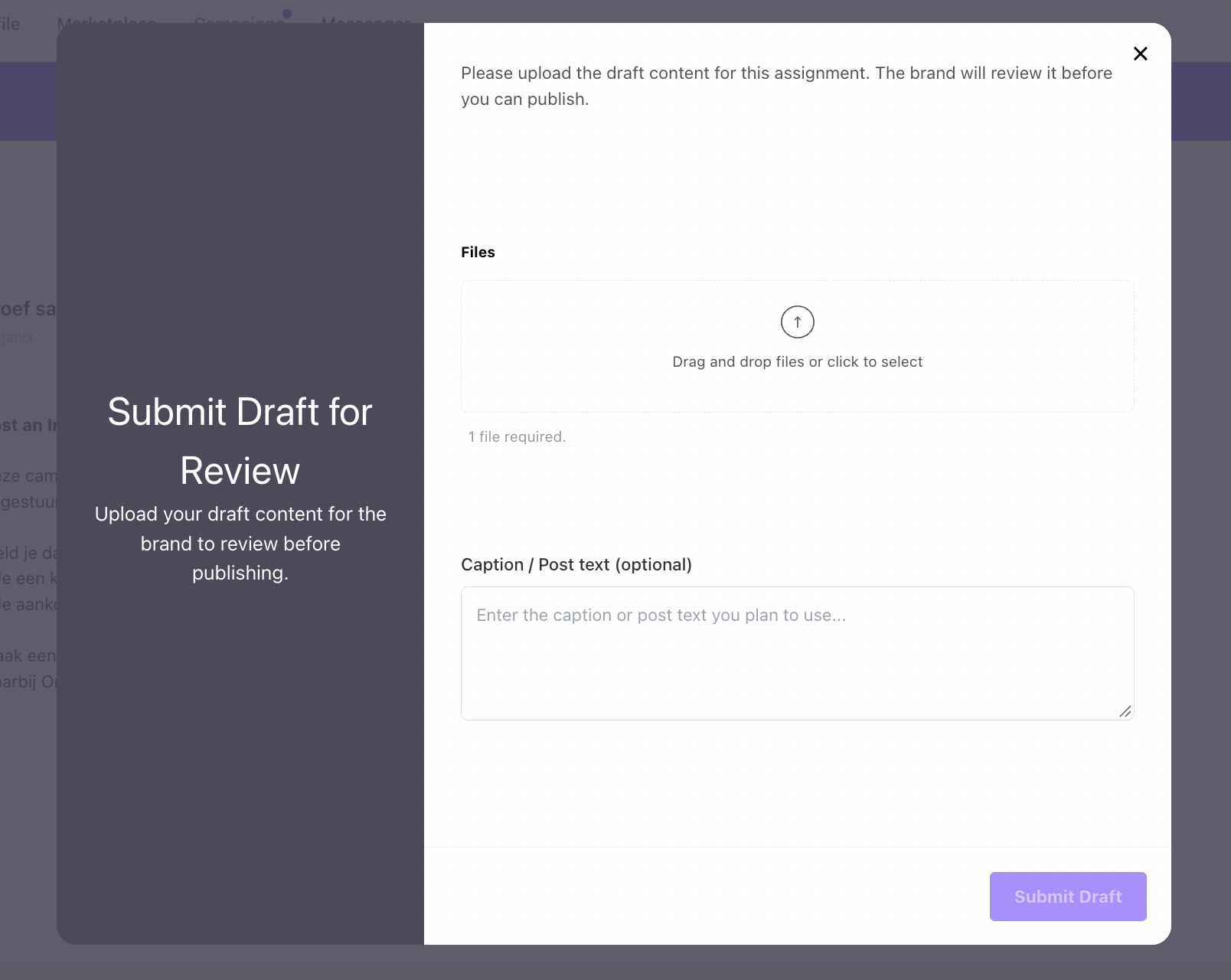
- Upload your draft video or images to that deliverable. Add a short note if you want to explain something to the brand, such as your caption or planned posting date.
- Submit the draft. Its status changes to awaiting review and the brand is notified.
 Tips
Tips
- Read the briefing again before you upload. Drafts that follow the briefing are approved faster.
- Upload the content in its final format and quality, so the brand reviews exactly what will go live.
- Don't post your content yet. Wait until your draft is approved.
Step 2: Wait for the brand's review and process any feedback
The brand reviews your draft and either approves it or asks for changes. You'll get a notification either way.
If your draft is approved, go straight to Step 3.
If the brand requests changes:
- Open the deliverable in your assignment and read the brand's feedback carefully.
- Adjust your content based on the feedback. If something is unclear, ask the brand through the messenger before you start editing.
- Upload the new version of your draft to the same deliverable. It is saved as a new version and goes back to awaiting review.
- Repeat until the brand approves your draft.
In most campaigns you can expect up to two feedback rounds.
Step 3: Upload the final version after approval
Approval is not the finish line. After your draft is approved, you still need to deliver the final version in the same assignment. How you do this depends on the type of deliverable.
Deliverable type | What to do after approval |
|---|---|
UGC video (not posted on your channel) | Upload the approved video again as the final version in the deliverable. Use the full-quality file. |
Instagram Reel, Post or Story | Post the approved content on your Instagram on the agreed date. Then go back to the deliverable and select the post that went live from your connected Instagram account. |
TikTok video | Post the approved video on your TikTok on the agreed date. Then go back to the deliverable and select the video that went live from your connected TikTok account. |
Good to know
- Post the approved version only. Don't make changes after approval without checking with the brand first.
- To select a live Reel or TikTok, your Instagram or TikTok account must be connected to Influentials. Check your connection before posting day.
- If your post doesn't appear in the list right away, wait a few minutes and refresh. Still nothing? Contact our support team.
- In a campaign with several deliverables, you can finalise each one as soon as it's approved. You don't have to wait until all your drafts are approved.
Step 4: Check your assignment is fully complete
Your assignment is complete when every deliverable has its final version uploaded or its live post selected. Before you consider the campaign done, check:
- Every deliverable in the assignment has an approved draft (if the campaign uses draft review).
- Every UGC deliverable has the final video uploaded.
- Every Instagram or TikTok deliverable has the live post selected.
- Your content is live on the dates agreed with the brand.
- You've given the brand a final rating and the assignment disappeared from your to do's.
Once everything is complete, the brand receives your final content and performance data, and we can process your payment. An incomplete assignment means a delayed payment.
Frequently asked questions
My draft is approved. Am I done? Not yet. You still need to upload the final version or select your live post (Step 3). Without it, the brand doesn't receive your content and we can't process your payment.
Does every campaign use draft review? No. The brand decides per campaign. If your assignment doesn't ask for a draft, you can deliver your final content directly. Your assignment / briefing brand will tell and show if a review is needed.
I already posted before my draft was approved. What now? Contact the brand through the messenger straight away. If they ask for changes, you may need to edit or repost.
My Reel or TikTok doesn't show up when I try to select it. Check that the account you posted on is connected to Influentials and that the post is public. Wait a few minutes and refresh. If it still doesn't appear, contact our support team.
The brand hasn't reviewed my draft yet. Brands get a notification for every new draft. If you haven't heard back within a few working days, send them a friendly reminder through the messenger.