Woohoo! 🎉 You’ve successfully completed your collaboration and are ready to receive your well-deserved reward.
In this article, we’ll explain when you get paid, where to find your earnings, and how to withdraw your balance to your bank account.
💰 Your Wallet
In your virtual wallet, you’ll find an overview of:
- Your current balance
- Your total earnings
- The total amount you’ve withdrawn
- Your average monthly payout

📅 When will I get paid?
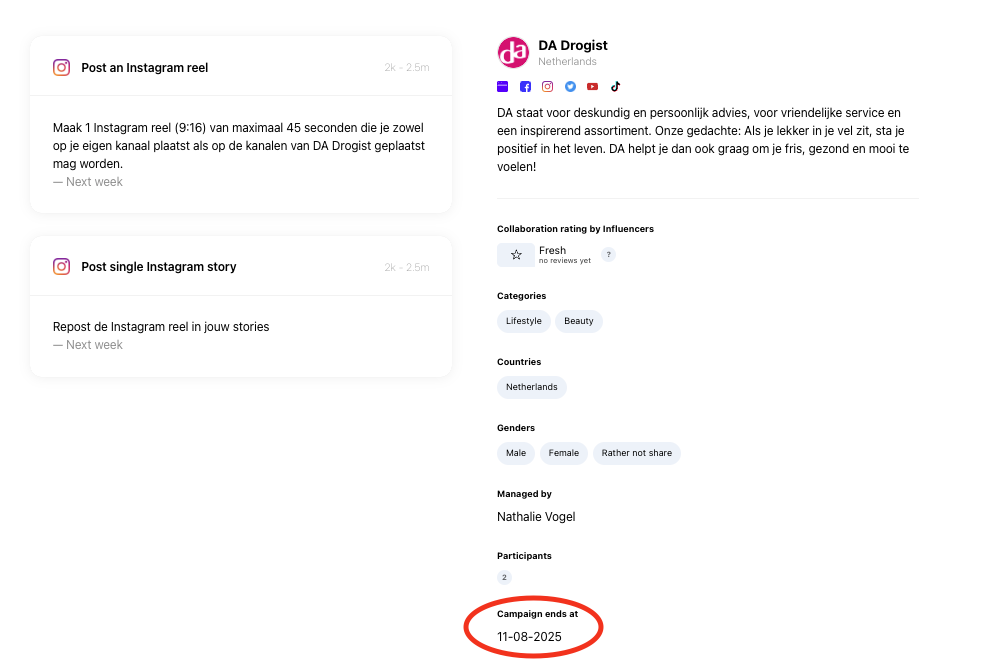
Once you’ve successfully completed all your assignments and uploaded the required content and statistics correctly, your payment will be processed 10 - 15 days after the campaign end date.
Important: The campaign end date is not the same as your content deadline or the date on which you completed your assignment.
You can find the campaign end date at the bottom of the campaign page. Simply add 10 - 15 days to this date to get an indication of when your reward will be added to your wallet.
Weekends and public holidays
Please keep in mind that payouts are processed on business days. If your expected payout date falls on a Friday, weekend, or public holiday, processing may be delayed until the beginning of the following working week.
So don’t worry if your balance isn’t updated exactly 10 days after the campaign end date in these situations.
⏰ What if I missed a deadline?
To receive your reward on time, make sure that you:
- Complete all assignments
- Upload your content correctly
- Submit all required statistics
- Follow the deadlines and guidelines provided by the brand
If an assignment is incomplete, content or statistics are missing, or a deadline has been missed, your payment may be delayed.
If you know you won’t be able to meet a deadline, please inform the brand — and Influentials if necessary — as soon as possible.
Once everything has been completed correctly, your payout can be processed.
💌 You've got mail, get your money!
Once your reward has been processed, your Influentials wallet will be topped up automatically and you’ll receive an email notification.
Your current wallet balance will show the amount available for withdrawal.
To transfer the money to your bank account:
- Log in to Influentials.
- Go to your Wallet.
- Click the Withdraw button.
- Confirm that you want to transfer the money to your connected bank account.

That’s it! 🎉
After requesting your withdrawal, it can take up to 7 days for Stripe, our payment partner, to transfer the money to your bank account.
Please note that these 7 days are separate from the 10-day payout period after the campaign end date. The first period determines when the reward is added to your Influentials wallet; the second is the processing time for transferring your withdrawn balance from Stripe to your bank account.
🧾 Transactions
Want to keep track of your earnings? Scroll down in your wallet to find an overview of all your transactions.
Here you can see all changes to your wallet balance, such as funds received after successfully completing a collaboration.

📄 Invoices
Your invoices for completed collaborations can be found under the Invoices tab next to your Wallet.
When you successfully complete all assignments for a campaign, we create an invoice on your behalf through self-billing. This is normally done within 10 days after the campaign end date.
Once the invoice has been created and processed, the corresponding funds are added directly to your Influentials wallet.
Remember: you can find the campaign end date at the bottom right of the campaign page.
You can download each invoice for your own administration by clicking Download.
The invoice overview includes:
- Your unique invoice number
- The invoice date
- The campaign title
- The amount paid

💡 Is VAT included?
If you are entitled to receive VAT, it’s important to add a valid VAT number to your Influentials account.
Adding only your Company ID is not enough. Without a valid VAT number registered in your account, your reward will be processed excluding VAT.
To make sure VAT is included when applicable, always check that your VAT details are complete and up to date before your payout is processed.

Still have questions?
If your expected payout date has passed and you’ve checked that all assignments, content, and statistics have been completed correctly, feel free to contact us through the chat or email hello@influentials.com.